
To guarantee proper functionality of your video doorbell, we need to use the 2.4GHz Wi-Fi band, as it’s more effective outdoors. We should aim for a signal strength of at least -65 dBm and place the router within 100 feet of the doorbell to minimize dropouts. If the connection isn’t strong enough, we might consider using Wi-Fi extenders. Understanding these requirements will help us troubleshoot further issues effectively and optimize the device’s performance.
Key Takeaways
- Use the 2.4GHz band for better range and compatibility with video doorbells, as many do not support 5GHz connections.
- Ensure a minimum signal strength of -65 dBm for reliable video feed and to avoid connection drops.
- Position the router within 100 feet (30m) of the doorbell, ideally in an open area to maximize signal range.
- Test upload speeds at the installation site, aiming for at least 2 Mbps to ensure smooth video functionality.
- Consider using Wi-Fi extenders or a mesh network if the signal strength is weak or if there are dead zones.
Understanding Video Doorbell Wi-Fi: 2.4GHz vs. 5GHz

When considering a video doorbell, understanding the differences between the 2.4GHz and 5GHz Wi-Fi bands is important for ideal performance. The 2.4GHz band typically offers better range and can easily penetrate walls, making it effective for outdoor installations. Conversely, the 5GHz band provides faster upload speeds but lacks the same range, which can be problematic if your video doorbell is far from the router. For best performance, we should guarantee a minimum signal strength of 66%. It’s essential to check our existing Wi-Fi network settings, as many video doorbells don’t support 5GHz connections. Monitoring upload speed is also critical; we recommend at least 2 Mbps to maintain a reliable video feed, especially when multiple devices are connected. Additionally, ensuring the video doorbell chime has a wireless range sufficient to cover your home can help prevent connectivity issues caused by walls or furniture.
Why Strong Wi-Fi Signal Matters for Your Video Doorbell

A strong Wi-Fi signal is essential for your video doorbell to function effectively. Ideally, we should aim for a signal strength of at least -65 dBm. Weak signals lead to connection drops and poor video quality, impacting our ability to monitor our front door. For most video doorbells, the minimum upload speed should be 2 Mbps, but higher resolutions require faster internet speeds. Utilizing the 2.4GHz band is preferable because it provides better range and can penetrate obstacles, making it ideal for outdoor use. Before setting up, we recommend testing Wi-Fi speeds at the installation location to verify our network meets the doorbell’s requirements for reliable performance. This helps us avoid frustrations later on. Additionally, ensuring compatibility with your doorbell’s video quality capabilities, such as 1080p or 2K resolution, optimizes the overall performance of the device.
How Router Placement Affects Your Video Doorbell Connectivity
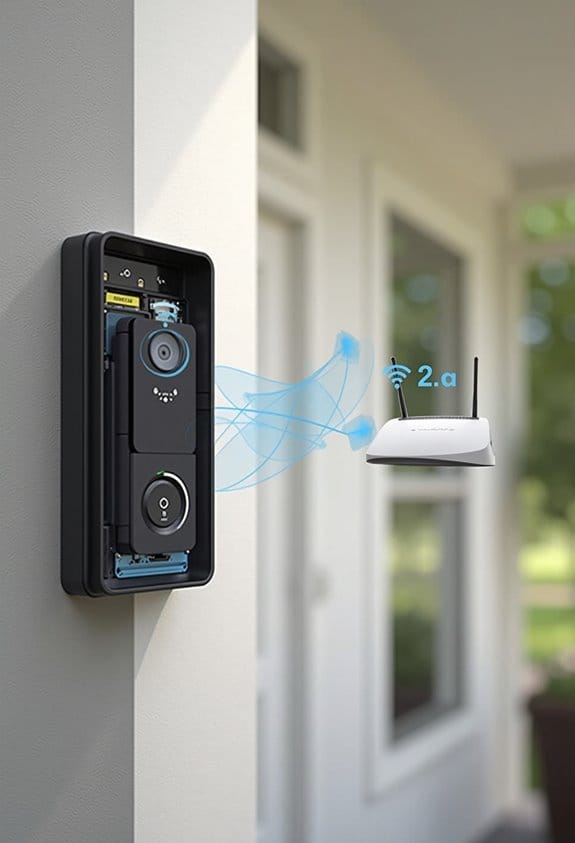
Router placement has a significant impact on the connectivity of our video doorbell. To maintain a strong signal, we should position the router no more than 100 feet (30m) from the doorbell. It’s crucial to avoid dead zones, commonly found behind walls or obstructions like cabinets and TVs, as these can severely weaken the Wi-Fi signal strength. We recommend placing the router in an open area to maximize network range. In addition, for peak performance, the router should broadcast on a 2.4GHz frequency, which is ideal for video doorbell applications. Regularly testing the Wi-Fi signal strength at the doorbell location using the device app can help us adjust the router placement as needed, ensuring reliable connectivity. Additionally, selecting a doorbell camera with motion detection zones can optimize alert accuracy by reducing false alarms caused by weak signals.
Step-By-Step Guide to Troubleshooting Wi-Fi Issues With Your Doorbell
To resolve Wi-Fi issues with your video doorbell, we should start by checking the connection to confirm it’s properly established. First, verify your Ring Doorbell is connected to a 2.4GHz Wi-Fi network, since it doesn’t support 5GHz frequencies. Next, check the router’s signal strength; it should be at least -65 dBm for ideal performance. We can test the connection speed at the installation site using a smartphone, aiming for an upload speed of 1-2 Mbps for each connected device. If the signal is weak, consider relocating your router or using a Wi-Fi extender to boost the reach. Finally, use the app to check the doorbell’s connection health and troubleshoot any issues, confirming correct passwords and network visibility. Additionally, to enhance the visibility of your doorbell button in low light, using a model with an LED light feature can improve user experience and curb appeal.
Top Tips to Improve Your Video Doorbell’s Wi-Fi
When we want to enhance our video doorbell’s Wi-Fi connection, there are several effective strategies to contemplate. First, confirm your doorbell connects to a 2.4GHz network for better range, as most doorbells, like Ring, don’t support 5GHz. We should also check the signal strength; it needs to be at least -65 dBm for reliable video. Positioning the router in a central location near the front door can help minimize obstructions. For areas with weak or non-existent Wi-Fi, consider using Wi-Fi extenders or a mesh network to improve Wi-Fi coverage. Finally, let’s verify our Wi-Fi password is correct and regularly check internet speed, confirming a minimum upload speed of 2 Mbps for ideal camera functionality. Choosing a video doorbell with features like night vision ensures you maintain clear video quality even in low-light conditions.
Frequently Asked Questions
Does Ring Require 2.4 or 5GHZ?
The Ring requires 2.4GHz Wi-Fi bands for compatibility. For installation, we should guarantee proper router positioning to minimize signal interference. This improves network stability, enhances video quality, and maintains data security in our smart home setup.
Can 5GHZ Wifi Go Through Walls?
5GHz Wi-Fi struggles to penetrate walls effectively, resembling sunlight filtered through clouds. We must consider wall material impact, signal attenuation factors, and router placement tips to guarantee solid connections within our smart home ecosystem.
How to Improve Signal Strength on Ring Doorbell?
To improve signal strength on our Ring Doorbell, we should consider Wi-Fi extenders, check router settings for congestion, guarantee ideal device placement away from interference sources, and regularly update firmware for better connectivity.
Is 2.4 or 5.0 GHZ Faster?
When we compare Wi-Fi speeds between frequency bands, 5GHz offers faster data transfer for streaming quality but suffers from range limitations and signal interference. Conversely, 2.4GHz handles network congestion well and boosts device compatibility.